
AetherSX2 APK + BIOS (v1.5-4248)
Want to play PlayStation 2 games on your phone? AetherSX2 turns your Android device into a portable PS2. Download the APK and BIOS below, then follow the setup guide to start playing in minutes.
| Version | v1.5-4248 |
| Size | Around 20 MB |
| Android | 8.0 or higher |
| Developer | Tahlreth |
| Formats | ISO, CHD, CSO |
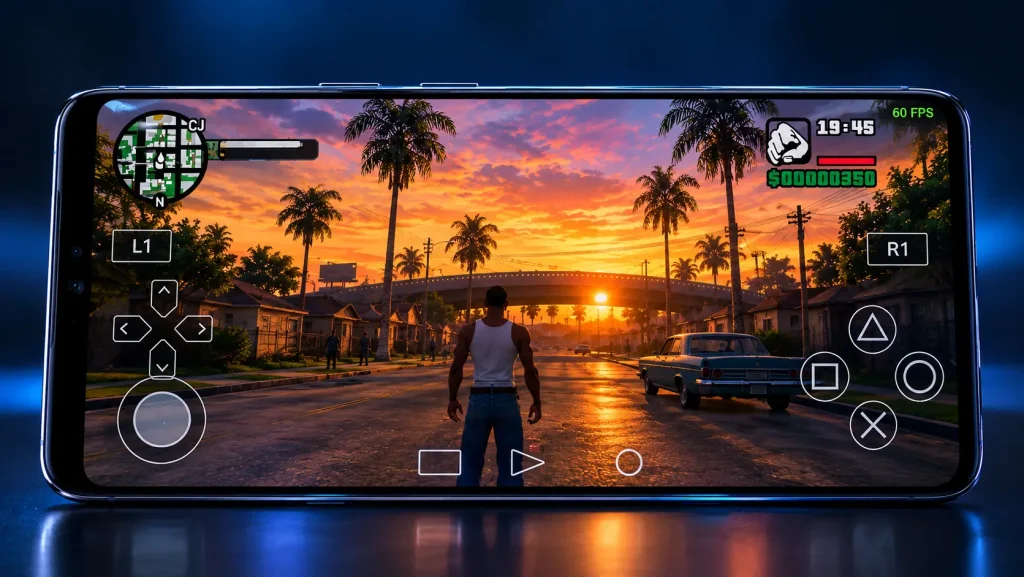
Want to play PlayStation 2 games on your phone? AetherSX2 makes it possible. It turns an Android device into a portable PS2. You only need the app, a PS2 BIOS file, and your own game files. This page gives you the latest version, the BIOS, a full setup guide, and honest answers to common questions.
Quick facts:
Latest version
PS2 games supported
On capable phones
No purchase needed
What Is AetherSX2?
AetherSX2 is a PlayStation 2 emulator for Android. It is built on PCSX2, the trusted PS2 emulator for computers. A developer known as Tahlreth released it in December 2021.
Before this app, PS2 emulation on phones was slow and limited. This emulator changed that. It brought smooth, accurate gameplay to mobile for the first time.
The app does not include any games. It runs your own game files (ISO or CHD) using a PS2 BIOS. This is the same way a real console reads a disc.
AetherSX2 APK File Details
Download AetherSX2 APK for Android
The emulator is no longer maintained on the Google Play Store, so download the APK and BIOS from this page. Both files are small and safe.
Tap the download button near the top. The file is small and downloads in seconds on most connections. Once it finishes, move on to the install steps below.
Is AetherSX2 Still Available and Updated?
Yes, you can still download and use it. The app runs well on most modern phones.
There are no new official updates, though. The developer stepped away from the project in January 2023 after facing serious harassment. If you want active updates and fixes, use NetherSX2, explained further down.
How to Aether SX2 Install on Android
Follow these simple steps. The whole process takes a few minutes.
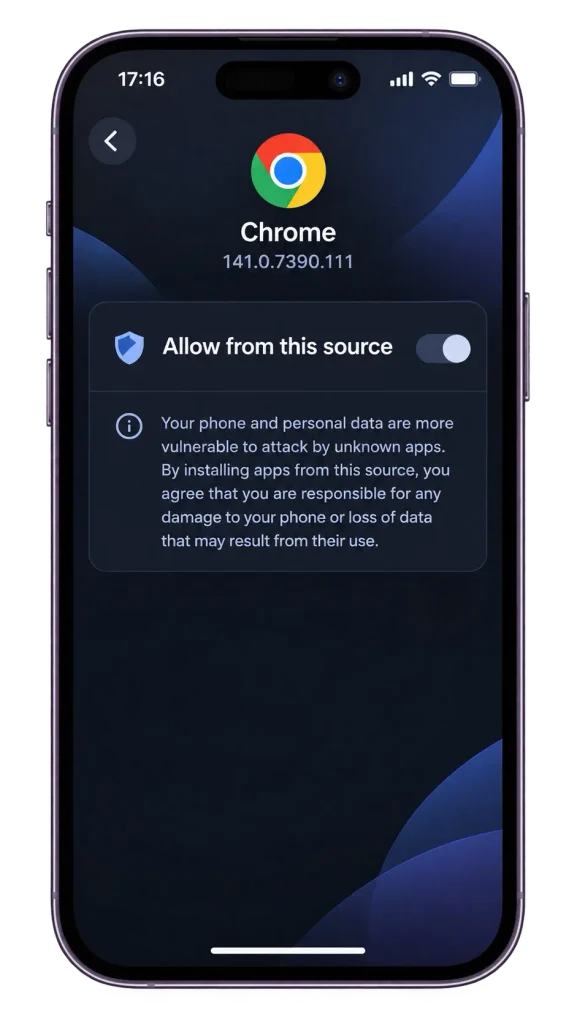
When you download the APK, your browser asks permission to install from it. Turn this on so the file can install.
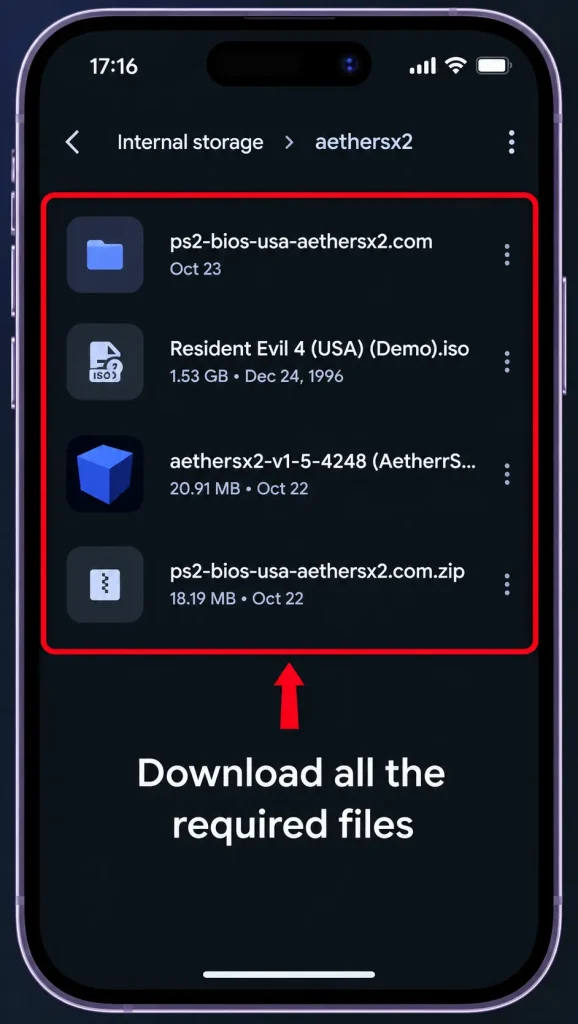
Make sure the AetherSX2 APK and your PS2 BIOS file are both saved on your phone before you start.
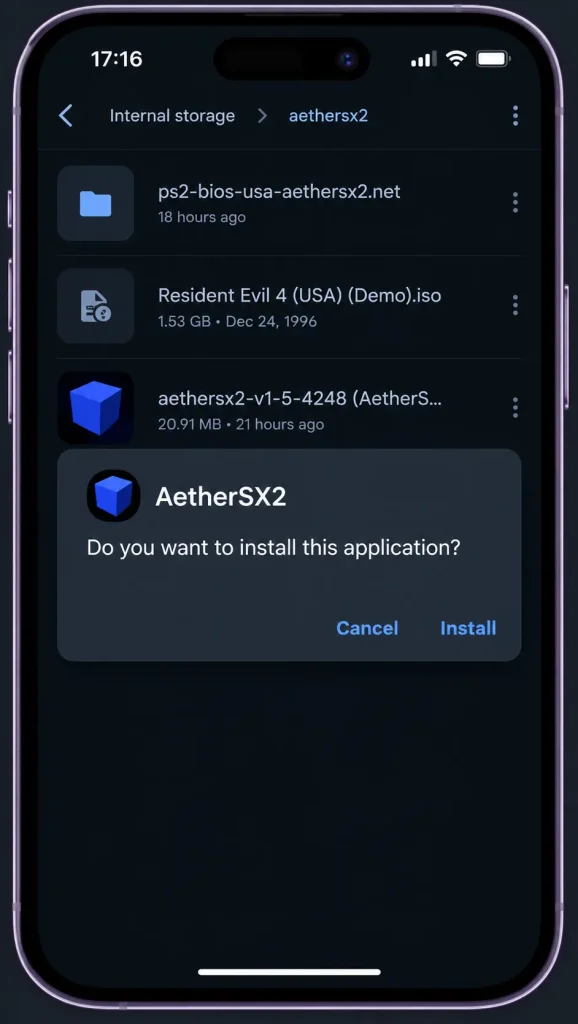
Tap the downloaded APK file and confirm the prompt to add the app to your phone.
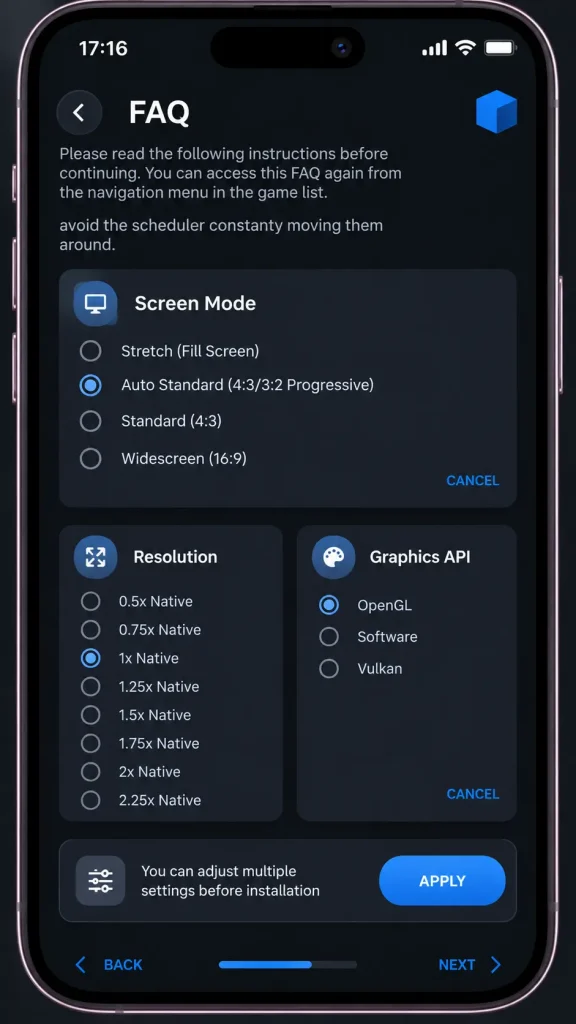
Choose the aspect ratio, upscale multiplier, and GPU renderer that suit your phone.
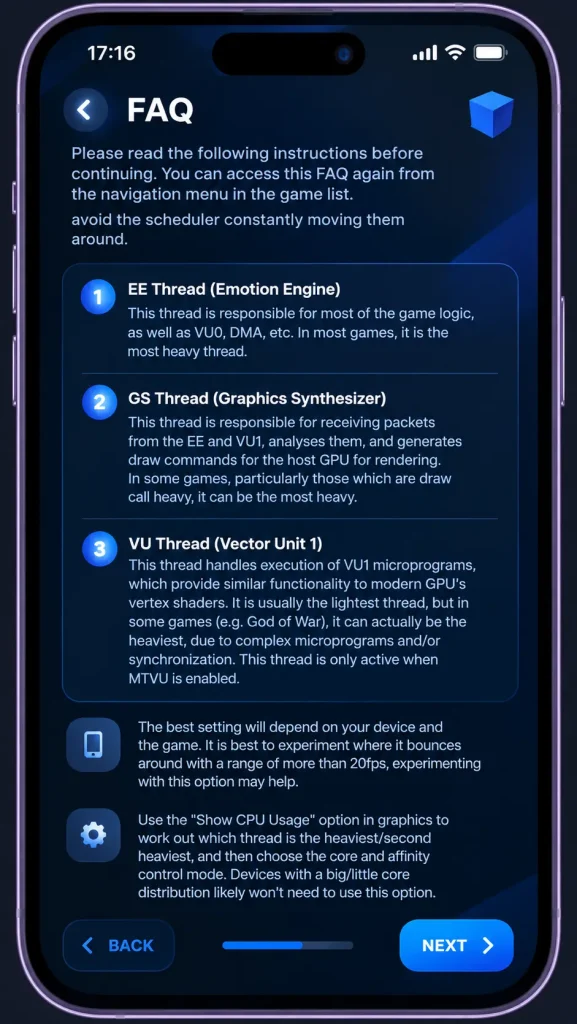
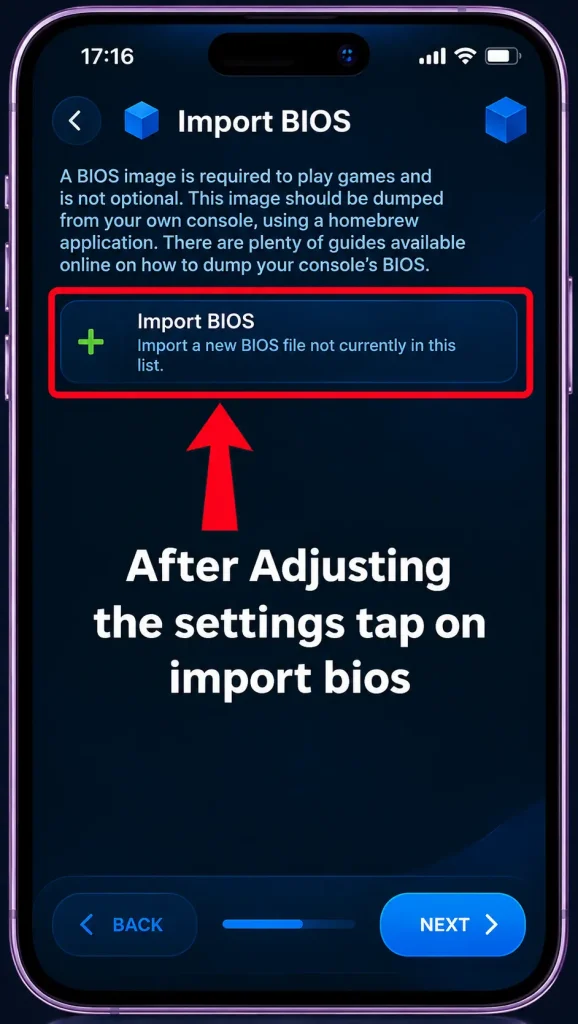
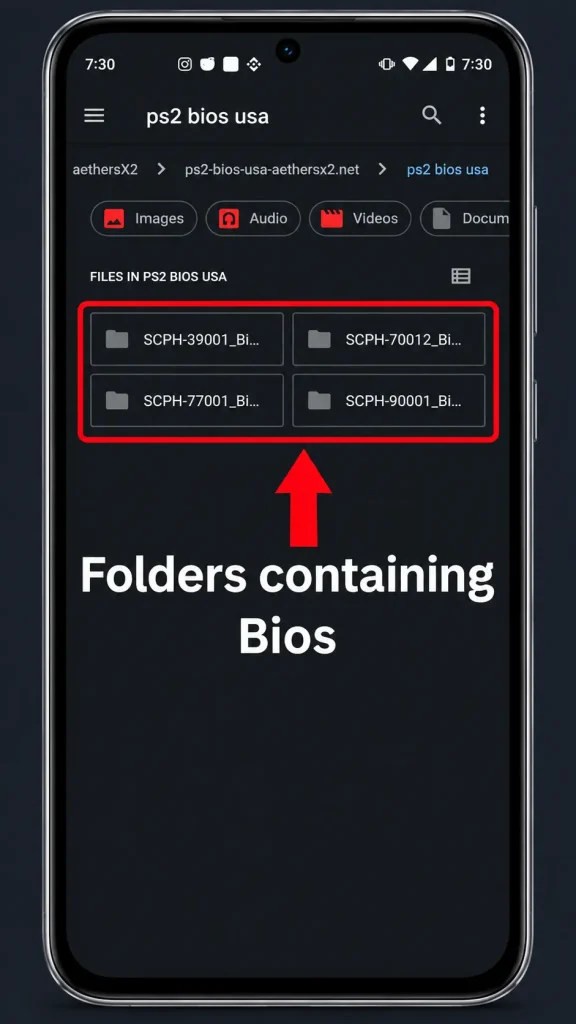
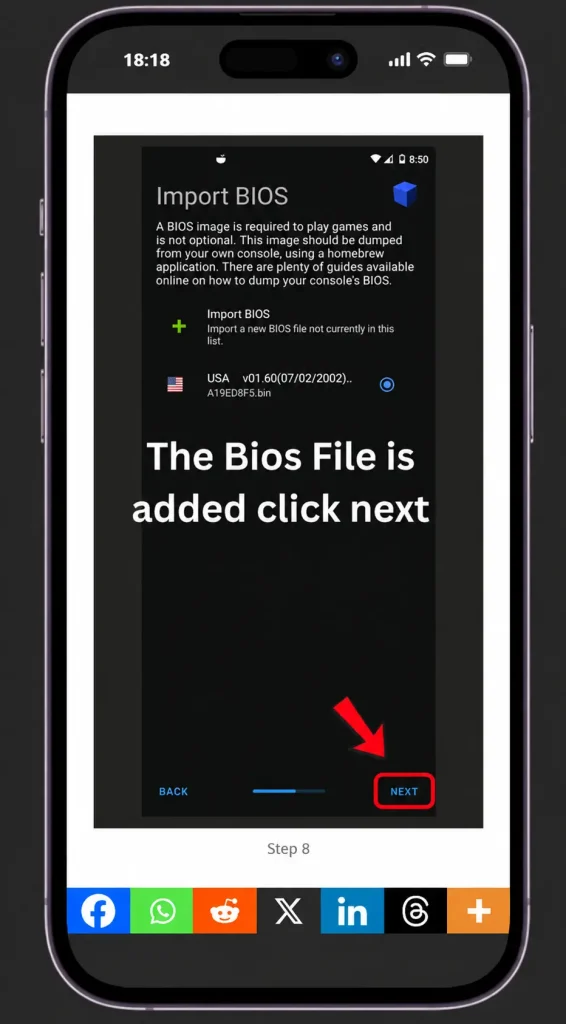
Tap Import BIOS and browse to the folder where you saved the BIOS file.
Several BIOS files exist for different regions. Select the one that matches your games.
Once the correct BIOS shows as added, tap Next to move on.
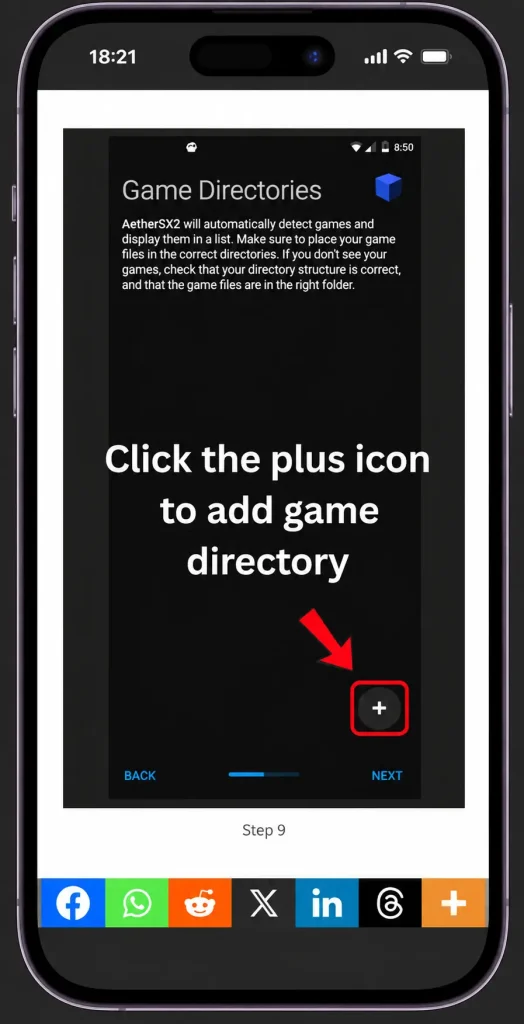
Tap Add Game Directory to tell the app where your games are stored.
Open the folder with your ISO or CHD files and tap Use This Folder.
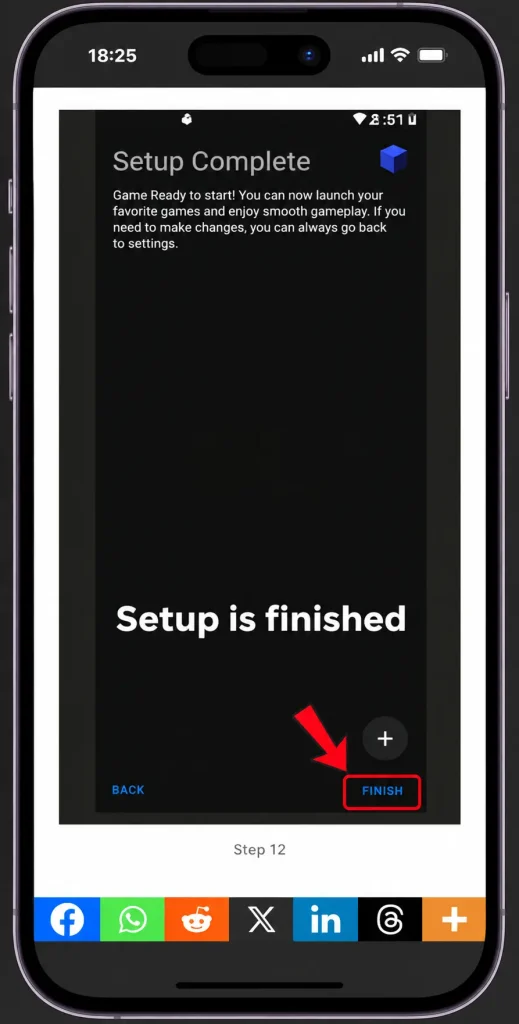
Tap Next, then Finish to complete the setup wizard.
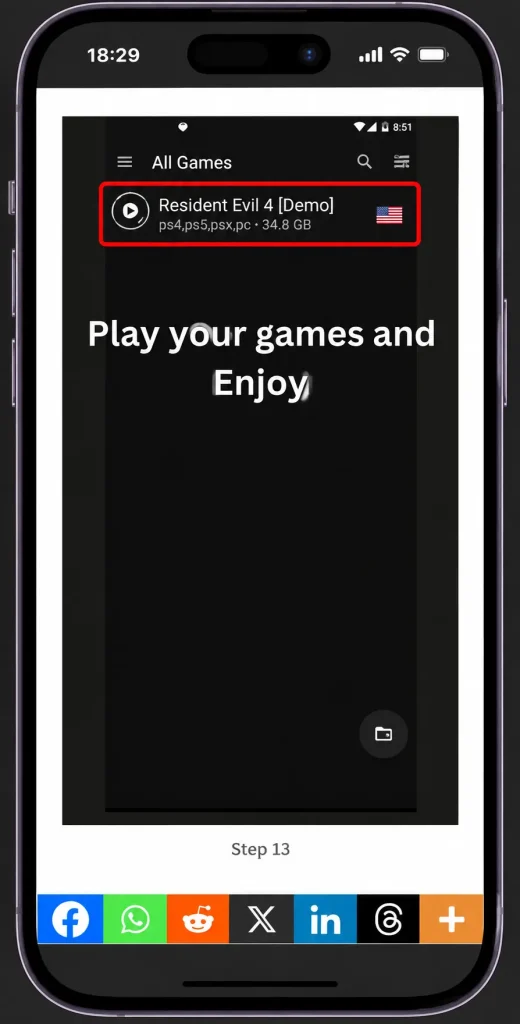
Your games appear in the library. Tap any title to launch it.
Embed your setup video here
A 2 to 4 minute install walkthrough boosts time on page.
Common Problems and Fixes
Most issues have quick fixes. Try these before giving up on a game.
Usually a wrong BIOS or a broken game file. Check that the BIOS region matches and try a fresh copy of the game.
Lower the resolution, turn off widescreen, and enable frame skip. Close background apps before you play.
The app cannot see your BIOS file. Move it to an easy folder like Downloads, then import it again from the BIOS screen.
Reconnect the Bluetooth or USB controller, then open the controls menu and map the buttons again.
Performance benchmarks
We tested popular PS2 games on real phones and recorded the average frame rate. Here is how they run.
| Game | Mid-range phone | Flagship phone | Best result |
|---|---|---|---|
| God of War 2 | Snapdragon 7 series | Snapdragon 8 series | 60 FPS |
| GTA San Andreas | Runs well | Runs great | 60 FPS |
| Final Fantasy X | Smooth | Smooth | 60 FPS |
| Shadow of the Colossus | Playable | Stable | 45 FPS |
AetherSX2 BIOS Download and Setup
The BIOS is a system file from the real PS2. The emulator cannot run any game without it. This is the step where most new users get stuck, so read it carefully.
How to Get the AetherSX2 BIOS the Safe Way
The correct way is to copy the BIOS from a PS2 console you own. You use a USB drive or a memory card to pull the file. This keeps you on the right side of the rules.
Many sites offer a direct BIOS download too. If you use one, only pick a clean and trusted source to protect your device.
Choose the Right BIOS Region
BIOS files come in different regions. Pick the one that matches your games. Games players in the United States usually use the USA BIOS. Players in Brazil and Europe usually pick the European (EUR) BIOS. Players who use Japanese titles pick the Japan BIOS.
How to Import the BIOS
Open the app and go to the BIOS setup screen. Tap Import BIOS, then find the file in your folders. Select it and confirm. The emulator is now ready to load games.
AetherSX2 vs NetherSX2: Which One Should You Download?
This is the most important choice for new users, and most sites skip the full truth.
The final official build (v1.5-4248) added ads and trackers. That is why the community made NetherSX2. NetherSX2 is a free fork by a developer named Trixarian. It removes the ads, fixes bugs, and adds new features. It is still updated today.
| Point | AetherSX2 | NetherSX2 |
|---|---|---|
| Ads | Yes, in the final build | No |
| Updates | Stopped in 2023 | Active |
| Stability | Good | Better |
| Best for | Casual use | New phones and best results |
Casual players can stick with AetherSX2 and it works fine. For the smoothest, ad-free experience on a newer phone, NetherSX2 is the better pick. You can find the official NetherSX2 build on its GitHub page.
Pros and Cons
A quick look to help you decide.
Pros
Cons
Best Aether SX2 Settings for Smooth Gameplay
The right settings make a big difference. Use the guide that matches your phone.
Settings for Budget Phones
- Renderer: OpenGL
- Resolution scale: 1x (native)
- Frame skip: 1 or 2
- Widescreen: Off
- Fast Boot: On
These keep games stable on 3 GB to 4 GB devices and reduce lag.
Settings for High-End Phones
- Renderer: Vulkan
- Resolution scale: 2x or 3x for sharper visuals
- Frame skip: Off
- Widescreen: On
- Fast Boot: On
Flagship phones can push higher resolution while holding a steady frame rate.
System Requirements
Your phone matters more than the app for smooth play. Aim for these specs.
- Processor: Snapdragon 845 or better
- GPU: Adreno gives the best results. Mali and PowerVR chips run slower due to driver limits.
- RAM: 4 GB or more
- Android: version 8.0 or higher, on a 64-bit device
Older or low-end phones can still run lighter games at lower settings.
Which PS2 Games are Compatible with Aether SX2 APK?
A large part of the PS2 library runs on capable phones. Popular titles like God of War, Grand Theft Auto San Andreas, Final Fantasy X, and Tekken run well on strong devices.
Performance depends on your phone and settings. Some heavy games need lower resolution to stay smooth. The app reads ISO, CHD, CSO, BIN, GZIP, and ELF files, so most game backups work.
Because the emulator is based on PCSX2, its game support is one of the best on mobile.
AetherSX2 for PC, iOS, and Other Platforms
There is no official version for PC or iOS. Here is what to use instead.
On a PC, use PCSX2. It is the desktop parent of this app and runs PS2 games at full quality. You can also run the Android APK inside a PC emulator, but PCSX2 is the smarter choice.
On iPhone and iPad, there is no official build. Apple limits this kind of app, so results are poor and unstable.
Common AetherSX2 Problems and Fixes
Most issues have quick fixes. Try these before giving up on a game.
Black Screen on Launch
This usually means a wrong BIOS or a broken game file. Check that your BIOS region matches, and try a fresh copy of the game.
Lag or Low FPS
Lower the resolution scale, turn off widescreen, and enable frame skip. Close background apps before you play.
BIOS Not Found
The app cannot see your BIOS file. Move it to an easy folder like Downloads, then import it again from the BIOS screen.
Controller Not Working
Reconnect your Bluetooth or USB controller. Then open the controls menu and map the buttons again.
Frequently Asked Questions
Final Thoughts
AetherSX2 remains one of the best ways to play PS2 games on Android. It offers strong game support, sharp visuals, and full controller support. Pair it with a proper BIOS and the right settings, and it feels close to the real console.
Development has stopped, so keep NetherSX2 in mind for updates and an ad-free experience. Either way, your favorite PS2 classics are only a few taps away.